
at a glance
Problem
A capable model that lawyers didn't trust yet, good prompts nobody could find, and no view of adoption.
My role
Sole designer and front-end engineer for the AI assistant, prompt library and usage dashboard.
Key decisions
Stream replies instead of waiting, save chats by default, treat prompts as editable starting points, and render output as text.
Outcome
Rolled out firm-wide, the prompt library became part of mandatory AI training, and I fixed an XSS vulnerability.
overview
Making AI usable, safe and measurable at a global law firm
Starting in 2023, I designed and built the front end for three connected internal tools: an AI assistant for drafting and summarizing, a prompt library for sharing prompts that work, and a usage dashboard that showed admins what people actually used.
When I joined, the assistant was mostly backend logic. I was the only designer and front-end engineer on the interface, so I took it from model capability to a production web app people could trust with client work.
About the visuals
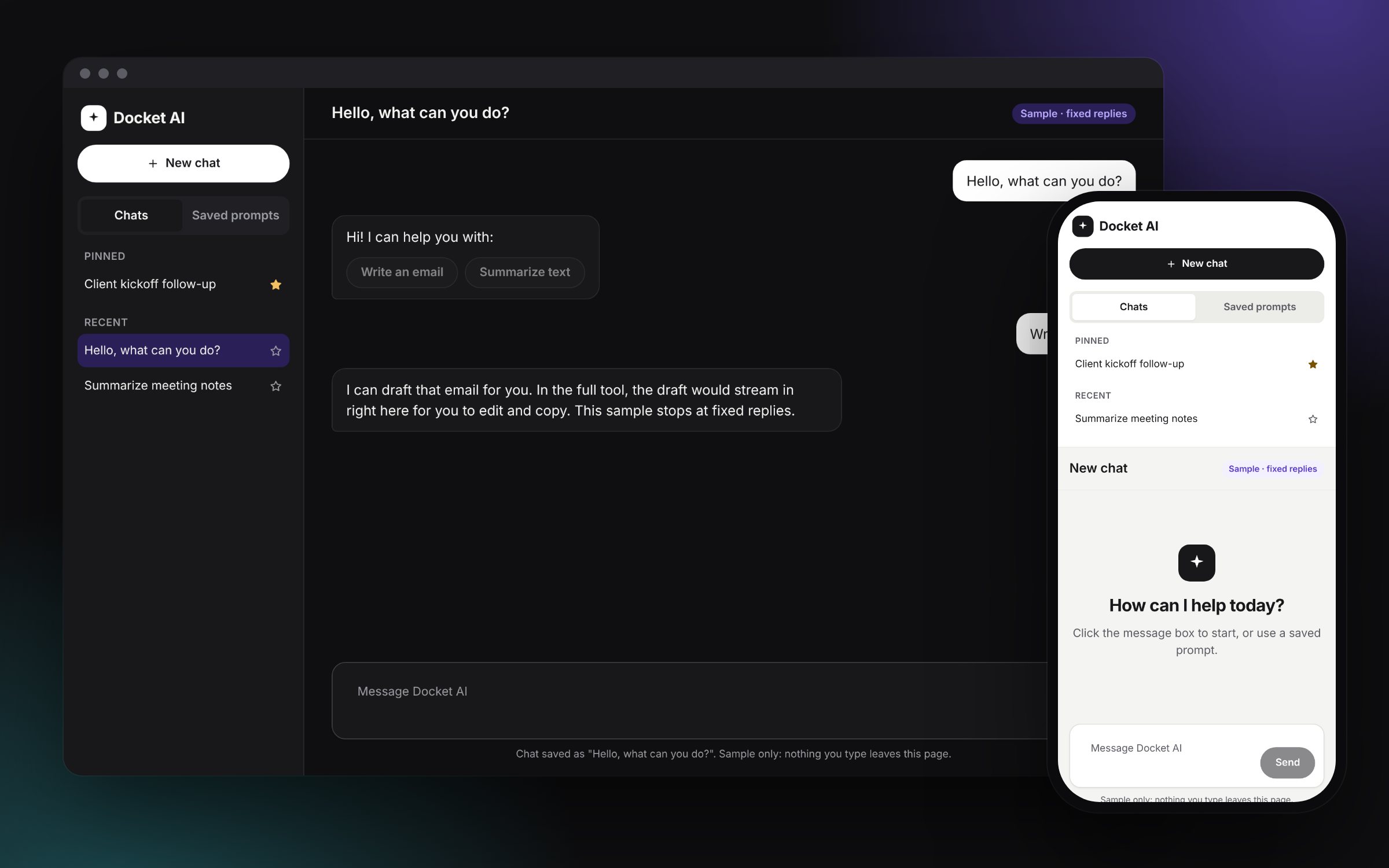
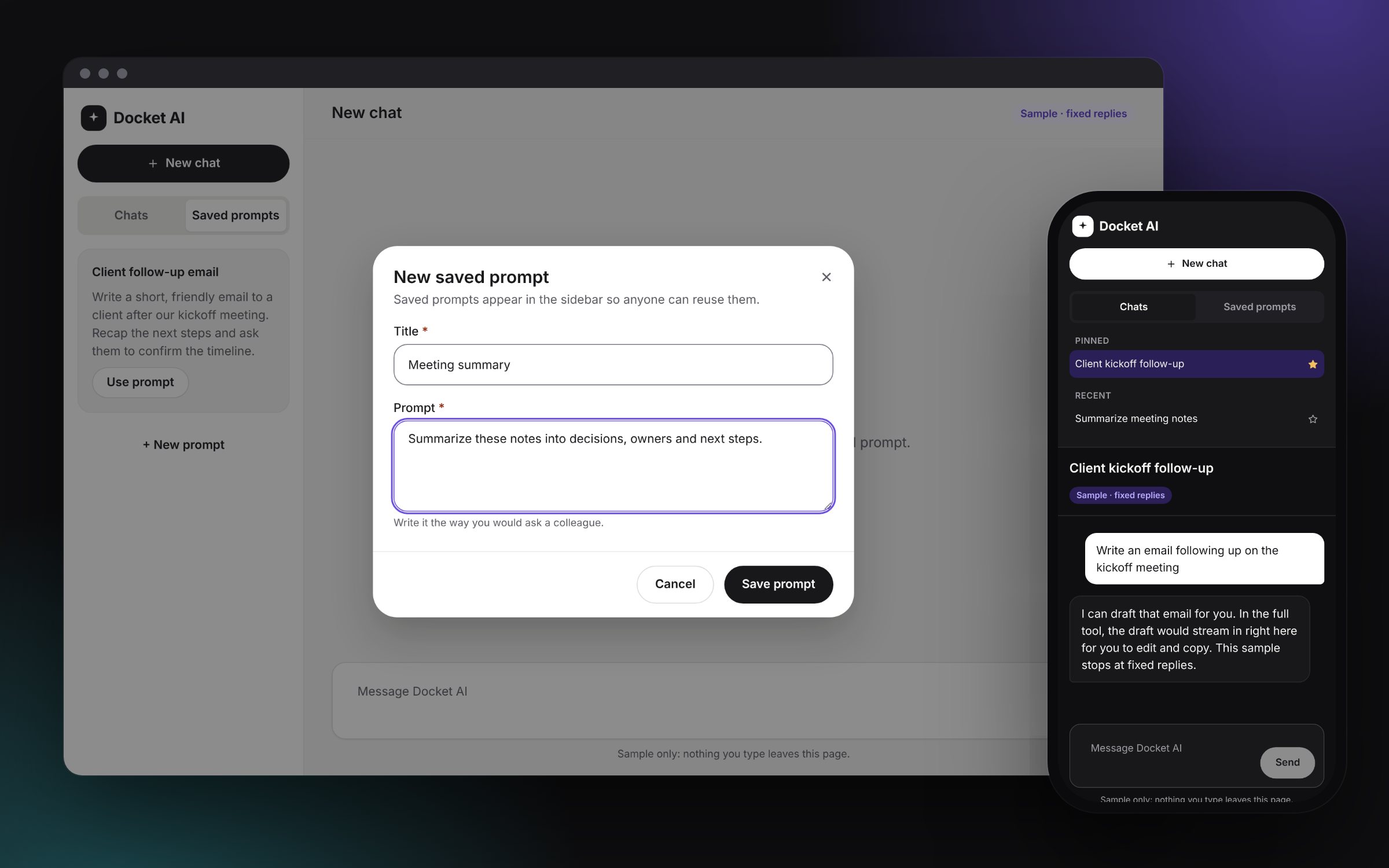
The real tools and their data are confidential. The screens on this page come from a working sample I built to show the same patterns: saved chats, a saved prompt library, and thinking and streaming states. It's an original design with fixed replies and fictional data, built on my Docket UI design system. Try the live sample.
Role
Sole designer and front-end engineer: UX, UI, front-end architecture
Users
Lawyers and professional staff; admins tracking usage
Stack
ASP.NET Core, JavaScript, jQuery, React, CSS
problem
A capable model that people didn't trust or know how to use
Trust
In legal work, a tool that feels slow or buggy doesn't get used. The first interface didn't give the feedback people expect from generative AI.
Where to start
Good prompts were scattered, duplicated or lost. Getting value depended on each person experimenting on their own.
No visibility
The team had no way to see which prompts people used, so it couldn't tell what was driving adoption.
what I built
Three tools, one experience
AI assistant
A front-end state machine for thinking and streaming states, so replies start appearing right away. Conversations save automatically, group by time, and can be favorited for repeat work. Built as modular chat components inside a legacy ASP.NET Core and jQuery front end.
Prompt library
A React app built around two actions: explore prompts and create prompts. Categories, tags and search help people find a vetted prompt, and reusable components and shared state let the library grow.
Usage dashboard
I owned a usage-tracking dashboard (ASP.NET Core and React) that let 2 to 5 admins see prompt usage across roughly 200 to 400 users, so they could see what drove adoption of the AI chatbot.
Security
I found and fixed a cross-site scripting (XSS) vulnerability in the assistant. In a firm that handles confidential client data, front-end security is part of the job, not someone else's problem.
decisions
Small choices that build trust
Stream instead of making people wait
Waiting on a blank screen feels broken. A thinking indicator followed by streamed text shows the tool is working, and Send is disabled while a reply is in progress.
Save by default
Lawyers come back to the same work. A chat is saved on its first message and named from what was asked, and the important ones can be pinned.
Prompts as starting points
A saved prompt drops into the message box to edit, not straight into the model. People adapt it to their matter and stay in control of what gets sent.
Model output is text, not markup
Responses render as text, never as raw HTML, which closes the door on injected scripts. Screen readers hear a streamed reply once it finishes, not one fragment at a time.
outcomes
From proof of concept to a firm-wide tool
Adoption
The assistant rolled out firm-wide and became part of everyday work.
Training
The prompt library became part of the firm's mandatory AI innovation training.
Investment
The project's success helped lead to a dedicated internal AI team.
live sample
Try the patterns yourself
Click the message box and it starts with "Hello, what can you do?" The replies are fixed: it offers to write an email or summarize text, and stops there. Your chat saves to the sidebar, and you can pin it, use the saved prompt, or create a new one.
Built with React and TypeScript from Docket UI components, with keyboard support, light and dark themes, and nine automated tests that cover the main flows, including accessibility checks.